> ## Documentation Index
> Fetch the complete documentation index at: https://xaferapi.apacx.io/llms.txt
> Use this file to discover all available pages before exploring further.
# Introduction
> The WaaS system provides a one-stop payment front-end page for merchants, called the **Checkout Page**. By embedding this page into their application or presenting it to users, merchants can offer their customers a convenient and secure deposit experience.
### Feature Description
The core functionalities of the Checkout Page include:
* **One-Stop Payment Service**: Provides merchants with a standardized deposit page to reduce development complexity.
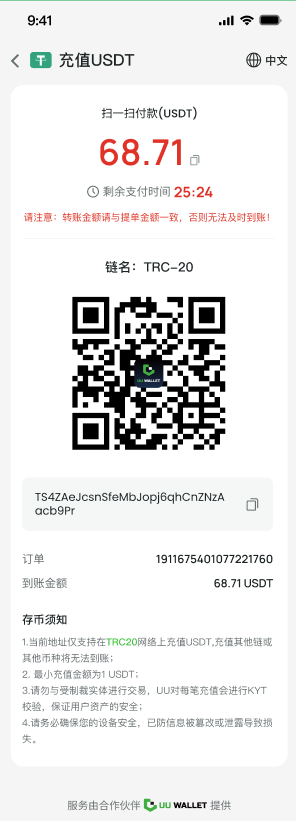
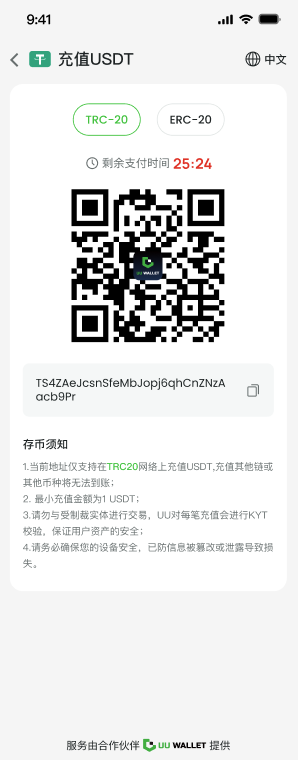
* **Information Display**: Displays the following key deposit-related information:
* Deposit Address
* Blockchain Type
* Currency
* Deposit Amount
* Expiration Countdown
* Order Number
* **User-Friendly Design**: Supports QR code display, allowing users to complete deposits by simply scanning a code.
* **Enhanced Security**: Hides all sensitive information via URL encoding to avoid plain text exposure.
***
### Merchant Use Cases
The Checkout Page is suitable for the following scenarios:
1. **Embedding Checkout Page in APP or Web**:
* Merchants can embed the Checkout Page in their applications, enabling users to complete deposits without navigating away.
2. **Displaying Offline QR Payment Codes**:
* Merchants can showcase a QR code containing Checkout Page information in physical stores or offline scenarios, enabling users to scan and complete deposits via the page.
***
### Checkout Page Frontend Example
Below are examples of the Checkout Page showcasing its main content and layout:
#### **With Amount**
#### **Without Amount**
***
### Core Advantages of the Checkout Page
#### **1. Optimized User Experience**
* Provides a user-friendly design with QR code scan payment support.
* Clear information display allows users to complete payment operations quickly.
#### **2. Secure Payment**
* Parameters are hidden through URL encoding, ensuring sensitive information is not exposed in plain text.
* Supports expiration time limits, preventing deposits after timeout to avoid payment errors.
#### **3. Easy Integration**
* Merchants can quickly launch the deposit function by simply embedding the Checkout Page without extra development effort.
***
### Optional Information for the Checkout Page
The Checkout Page supports displaying the following optional information, which merchants can enable as needed:
* **Deposit Instructions**: For example, blockchain type, support for small deposits, etc.
* **Exchange Rate Information**: Dynamically displays the current exchange rate for the currency, helping users understand the converted amount.
* **Merchant Logo**: Customizable branding at the bottom to enhance brand recognition.
* **Safety Tips**: For example, "Do not deposit unsupported currencies, as assets will be unrecoverable."
***
### Summary
The Checkout Page provides merchants with a standardized deposit process and security features, suitable for various payment scenarios. By embedding this page, merchants can quickly offer efficient and secure blockchain deposit services to their customers.